


ELLY TAYEBWA
Reviewed in the United Arab Emirates on 4 February 2025
Best quality
I received the best quality of item
5.0
۷٬۷۰۴٬۰۰۰ تومان
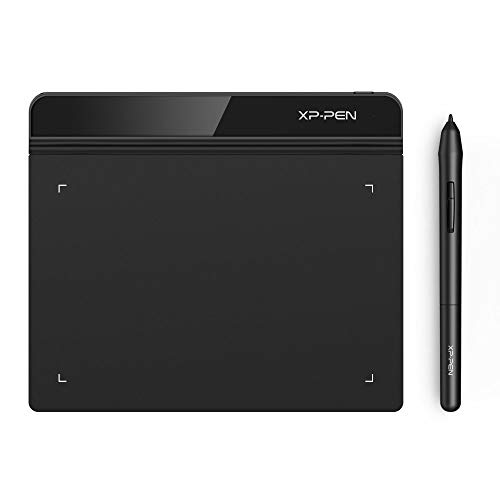
[مشخصات فنی] - Brand: XPPen - Model Name: StarG640 - Built-In Media: Passive Pen, 20 Refill Tips, USB Cable, Pen Clip, Quick Guide - Target Audience: Student - UPC: 654913041393 761460825922 - Item Ty
Xp-Pen Starg640 Ultra-Thin Graphic Drawing Tablet (6" X 4", 8192 Levels Of Pressure Sensitivity, Battery-Free Stylus, Black)
وزن
0.43 کیلوگرم
طراحی شده برای OSU! گیمپلی، طراحی، نقاشی، اسکچ، امضاهای الکترونیکی و غیره. نیازی به نصب درایور برای OSU نیست! حداکثر سرعت گزارش G640 به 266 RPS افزایش یافته است که باعث میشود خطوط سریعتر و روانتر حرکت کنند و عملکرد کلی را افزایش میدهند. جایگزینی عالی برای ماوس سنتی! قلم پیشرفته بدون باتری XP-Pen نیازی به شارژ ندارد و امکان طراحی و بازی مداوم و بدون وقفه را فراهم میکند. اکنون با 20 نوک جایگزین ارائه میشود. به شما امکان میدهد بیشتر لذت ببرید. منطقه فعال: 6 در 4 اینچ با استفاده کامل از 8192 سطح حساسیت فشار قلم ما - کنترل و روانی پیشگامانهای را برای گسترش خروجی خلاقانه شما فراهم میکند. G640 تنها 2 میلیمتر ضخامت دارد، به اندازه تمام تبلتهای گرافیکی سطح اولیه باریک است و به شما امکان میدهد آن را در حال حرکت با خود حمل کنید. کلید لمسی با یک کلیک به شما امکان میدهد فوراً بین قلم و پاککن جابجا شوید. مناسب برای کاربران راست دست و چپ دست G640 با سیستم عاملهای ویندوز 10/8/7 و مک 10.10 یا بالاتر سازگار است و با بسیاری از برنامههای نرمافزاری خلاقانه سازگار است. XP-Pen یک سال گارانتی و پشتیبانی فنی مادام العمر برای همه تبلتها/نمایشگرهای قلمی ما ارائه میدهد. با موارد مشابه مقایسه کنید
قیمت :
فروشگاه :

وزن
0.43 کیلوگرم
طراحی شده برای OSU! گیمپلی، طراحی، نقاشی، اسکچ، امضاهای الکترونیکی و غیره. نیازی به نصب درایور برای OSU نیست! حداکثر سرعت گزارش G640 به 266 RPS افزایش یافته است که باعث میشود خطوط سریعتر و روانتر حرکت کنند و عملکرد کلی را افزایش میدهند. جایگزینی عالی برای ماوس سنتی! قلم پیشرفته بدون باتری XP-Pen نیازی به شارژ ندارد و امکان طراحی و بازی مداوم و بدون وقفه را فراهم میکند. اکنون با 20 نوک جایگزین ارائه میشود. به شما امکان میدهد بیشتر لذت ببرید. منطقه فعال: 6 در 4 اینچ با استفاده کامل از 8192 سطح حساسیت فشار قلم ما - کنترل و روانی پیشگامانهای را برای گسترش خروجی خلاقانه شما فراهم میکند. G640 تنها 2 میلیمتر ضخامت دارد، به اندازه تمام تبلتهای گرافیکی سطح اولیه باریک است و به شما امکان میدهد آن را در حال حرکت با خود حمل کنید. کلید لمسی با یک کلیک به شما امکان میدهد فوراً بین قلم و پاککن جابجا شوید. مناسب برای کاربران راست دست و چپ دست G640 با سیستم عاملهای ویندوز 10/8/7 و مک 10.10 یا بالاتر سازگار است و با بسیاری از برنامههای نرمافزاری خلاقانه سازگار است. XP-Pen یک سال گارانتی و پشتیبانی فنی مادام العمر برای همه تبلتها/نمایشگرهای قلمی ما ارائه میدهد. با موارد مشابه مقایسه کنید
بر اساس نظرات آمازون
نظر شما میتونه به بقیه کمک کنه تا انتخاب بهتری داشته باشن خوشحال میشیم اگر تجربه تون از این محصول رو با ما به اشتراک بذارید!
نمایش ۱۲ نظر آمازون از ۵٬۷۸۴ نظر
Best quality
I received the best quality of item
Simple and easy
It's good product
Very helpful
Works perfect. Writing and drawing made easy. Easy to connect to PC
رائع
رائع
Assessment
Good product
worth for money
working well for my children, they are very happy to use, i got two for my two boys.
Great tablet - slightly small
Easy to connect and set up, good functionality, excellent quality, could just do with being a couple of centimetres bigger.
High quality
Amazing accuracy and really high quality for the price and amazing drivers too. 100% recommend
This is an AWESOME starting tablet!
I’ve been using it for a month now and it’s extremely responsive, the hover height is great, idk why people have been saying it’s not good. And the pressure works good as well on the pen. I recommend it to anyone starting out with digital art or animation!
Nice product for students and teachers.
Outstanding product. Very practical and value for money. Used very long time and it works excellent.
a short review
So I'm going to separate this review into 2 part: For Drawing and For Osu! 1) Drawing: the tablet is pretty good for beginners who want to try digital drawing. The active area may look small, but good enough for drawing. The pen is a bit slippery since it does not have any rubber band on the pen but the shape is smooth and easy to hold. The pressure sensitivity was ok and drawing on it is pretty ok. 2) Osu!: just buy this stuff if you want to go pro. For Osu!, the active area, latency, accuracy of the movement and the pen is those thing that i will review. The active area is big enough for playing with small or big area (although it's a bit uncomfortable when using small area since your hand will be at the position somewhere between your tablet and table. idk if there are any problem with big area players since i play with small area), latency and accuracy is over the top with the Hawku driver. The pen, in my point of view is a bit to small for my Osu! pen grip and just like i said earlier, a bit slippery too (this can be easily fix by just wrapped some tissues around the pen). More than that, I'm happy with it. P/s: I'm just a 4 digit noob so my Osu! review may not correct :(
Good Entry Tablet for drawing and good for Osu, but not perfect.
Pros: - Decent size active area that allows for drawing, so this tablet is perfect for someone that wants to try drawing on a tablet, but does not want to invest in a high end drawing tablet. - For the price, the build quality is decent and does not feel cheap, also it is slim, I found that great. - The new UI software driver is easy to navigate and install from their website. - Great for OSU because the available active area is big and thus you can customise it if you prefer a smaller one (do it from the driver software). Cons: - The drawing pad has more friction than your usual drawing tablet in my opinion (I only owned a few drawing tablet so I do not really know if its common), which can suprise you if you had a Huion 420 tablet for example to play OSU. That can be a pro or a con depends on you, but I saw a complain from a user for that. - The majority of the nibs provided are squeaky and thus do an incomfortable sound when you draw or play OSU on that tablet. However, a few of them are fine (out of the 20 ish that they provide , 4-5 are normal/you have to force it to make it squeak). I do not know if it is a general thing or just me being unlucky, but some users also reported that problem. The squeaking sound can be discribed as a fork rubbing against a ceramic plate, but less loud and intense, still annoying though. Apparently does two problems will solve with time by using the tablet (more use = rubbing pen against tablet and thus some kind of polishing over time).