


Jay Anne
Reviewed in the United Arab Emirates on 4 October 2022
Its good for its price
Its good for its price
5.0
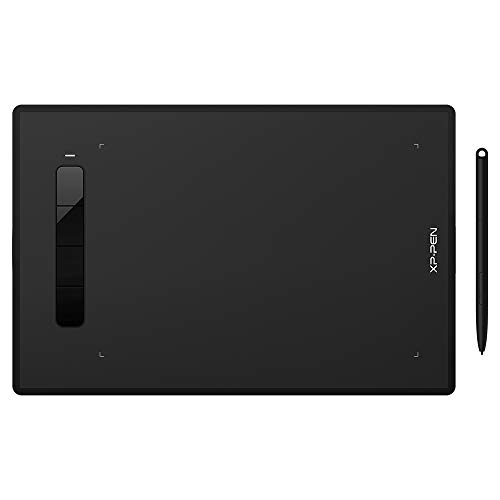
XP-PEN G960S 9 x 6 Inch Graphics Tablet with Stylus 8192 Level Tilt 60 Degree Compatible with Windows/Mac/Android
Color
Black
جدیدترین تبلت گرافیکی XP-PEN XP-Pen Star G960S دارای یک ناحیه کاری 9×6 اینچی و 4 کلید میانبر قابل تنظیم در سمت چپ است که فضای بیشتری را برای بیان ایده های خلاقانه در اختیار شما قرار می دهد و به شما امکان می دهد با حداکثر راحتی و کارایی خلق کنید. قلم غیرفعال قلم بدون باتری PH3 دارای 8192 سطح حساسیت فشاری است تا به آسانی خطوط و ضربات را به شکلی عالی بیان کند. از عملکرد شیب تا 60 درجه پشتیبانی می کند تا یک اثر شیب طبیعی و صاف برس را ایجاد کند. ایده آل برای نیازهای آموزشی اداری یا آنلاین: XP-Pen Star G960S با نرم افزارهای رایج Microsoft Office مانند Word، PowerPoint، OneNote و غیره کار می کند. از جوهر دیجیتال در Microsoft Office پشتیبانی می کند و به شما امکان می دهد همزمان با جوهر بنویسید و یادداشت ها و امضاهای دست نویس خود را به صورت بصری ارائه دهید. سازگاری بیشتر، بدون مشکل دیگر: Star G960S با اکثر نرم افزارهایی مانند ibis Paint X، FlipaClip، Medibang، Autodesk Sketchbook، Zenbrush، Artrage و غیره کار می کند. ایده آل برای طراحی، عکاسی، انیمیشن، مد، طراحی، ویرایش تصویر و غیره. اکنون از دستگاههای Android پشتیبانی میکند XP-Pen Star G960S از اتصال با تبلتها و تلفنهای همراه Android پشتیبانی میکند و به شما این امکان را میدهد که به هر کجا که ایدههایتان شما را میبرد بروید و در حال حرکت سازنده بمانید. علاوه بر این، با ویندوز 10/8/7، لینوکس (نسخه های تفصیلی)، Mac OS X10.10 و بالاتر نیز سازگار است.
قیمت :
فروشگاه :

Color
Black
جدیدترین تبلت گرافیکی XP-PEN XP-Pen Star G960S دارای یک ناحیه کاری 9×6 اینچی و 4 کلید میانبر قابل تنظیم در سمت چپ است که فضای بیشتری را برای بیان ایده های خلاقانه در اختیار شما قرار می دهد و به شما امکان می دهد با حداکثر راحتی و کارایی خلق کنید. قلم غیرفعال قلم بدون باتری PH3 دارای 8192 سطح حساسیت فشاری است تا به آسانی خطوط و ضربات را به شکلی عالی بیان کند. از عملکرد شیب تا 60 درجه پشتیبانی می کند تا یک اثر شیب طبیعی و صاف برس را ایجاد کند. ایده آل برای نیازهای آموزشی اداری یا آنلاین: XP-Pen Star G960S با نرم افزارهای رایج Microsoft Office مانند Word، PowerPoint، OneNote و غیره کار می کند. از جوهر دیجیتال در Microsoft Office پشتیبانی می کند و به شما امکان می دهد همزمان با جوهر بنویسید و یادداشت ها و امضاهای دست نویس خود را به صورت بصری ارائه دهید. سازگاری بیشتر، بدون مشکل دیگر: Star G960S با اکثر نرم افزارهایی مانند ibis Paint X، FlipaClip، Medibang، Autodesk Sketchbook، Zenbrush، Artrage و غیره کار می کند. ایده آل برای طراحی، عکاسی، انیمیشن، مد، طراحی، ویرایش تصویر و غیره. اکنون از دستگاههای Android پشتیبانی میکند XP-Pen Star G960S از اتصال با تبلتها و تلفنهای همراه Android پشتیبانی میکند و به شما این امکان را میدهد که به هر کجا که ایدههایتان شما را میبرد بروید و در حال حرکت سازنده بمانید. علاوه بر این، با ویندوز 10/8/7، لینوکس (نسخه های تفصیلی)، Mac OS X10.10 و بالاتر نیز سازگار است.
بر اساس نظرات آمازون
نظر شما میتونه به بقیه کمک کنه تا انتخاب بهتری داشته باشن خوشحال میشیم اگر تجربه تون از این محصول رو با ما به اشتراک بذارید!
نمایش ۹ نظر آمازون از ۱٬۱۸۳ نظر
Its good for its price
Its good for its price
Good
The pen button fell out which i had to glue back on lol, but there was warranty but i didnt want to go through the hassle. I had to download a software to properly use the laptop, hard to connect to new devices sometimes.
Recieved defected product
The stylus was broken and the device did not connect to windows
XP-PEN G960S Graphics Tablet 9x6 inch Drawing Tablet with Battery-free Stylus Support Wind
Perfect service.
Ideal for teaching of maths
Ideal piece of kit. Make sure you install the xp drivers to enjoy all the functionality. I'm using this as a teaching aid. I can annotate word documents while teaching online. Very good value piece of kit
Başarılı Fiyat/Performans
Epey başarılı bir cihaz. Yanından fazlaca yedek uç geliyor. Kullanımı da kolay
Simply awesome
After reading negative reviews, I had apprehensions in using the tablet. But let me tell you, all those who want to buy this please do so because it is a wonderful product. I am a teacher and teaching online has become so easy for me. I can use this graphic tablet with Microsoft whiteboard as well as google jam board. For all the tests that I conduct, I download the pdfs and check them as if I am using a pen to correct the notebooks. This product is so convenient to use. For beginners it's a thumbs up. Go for it. I can assure you that you will not be disappointed.
Good beginner tablet, has a few minor issues
I've been using this tablet to draw my comic book and so far I'm really enjoying it. There are, however, a few issues that hold this tablet back. The line becomes jittery when you press down super light, so my previous work with pencils didn't entirely translate as I had to change how hard I pressed down. Another few issues are all to do with the little button near the front of the pen itsself. I HATE IT!!! I would always accidentally press the button whilst pressing down - causing my line to stop and start which sucked when trying to get one clean line. I tried taping over the button so that id stop pressing it but when the button is being pressed down and you continue drawing, the pressure sensitivity goes all weird and also, whenever i would accidentally drop my pen, the button would fall off entirely. The way i overcame all the issues with the button was by simply removing it and covering up the hole with tape that i could grip. the 4 buttons on the left of the tablet do the job. after a few weeks of use - some buttons are more clicky than others, with one or two feeling a tad mushy. nonetheless, the buttons do the job (aside from the one on the pen itself) and the fact i dont need to worry about a battery in the pen is a delight. It's got a lovely large area to draw with which is super nice, and is absolutely worth the price. If you're just starting out, this is a good tablet to experiment with.
xp pen graphic tablets are amazing
what i liked ? - size of this tablet,bigger than deco mini 7 - stylus has tilt support with high sensitivity - very easy set up - Android connectivity. you can connect this with Android devices using otg. what i disliked? the otg connector given with the tablet, especially the type c one: i have a OnePlus phone and the tablet was not detected by my phone when i used the otg connector given with the tablet. i used other otg cable which i was already using and the tablet got connected easily and is working fine. the otg connector given with the tablet might not work on some devices. I am sure about OnePlus 7!