


Syed Meesam Abidi
Reviewed in the United Arab Emirates on 5 May 2026
Good Value Product
excellent product, onboard nics cant handle jitter as these do!
5.0
۷٬۸۹۵٬۰۰۰ تومان
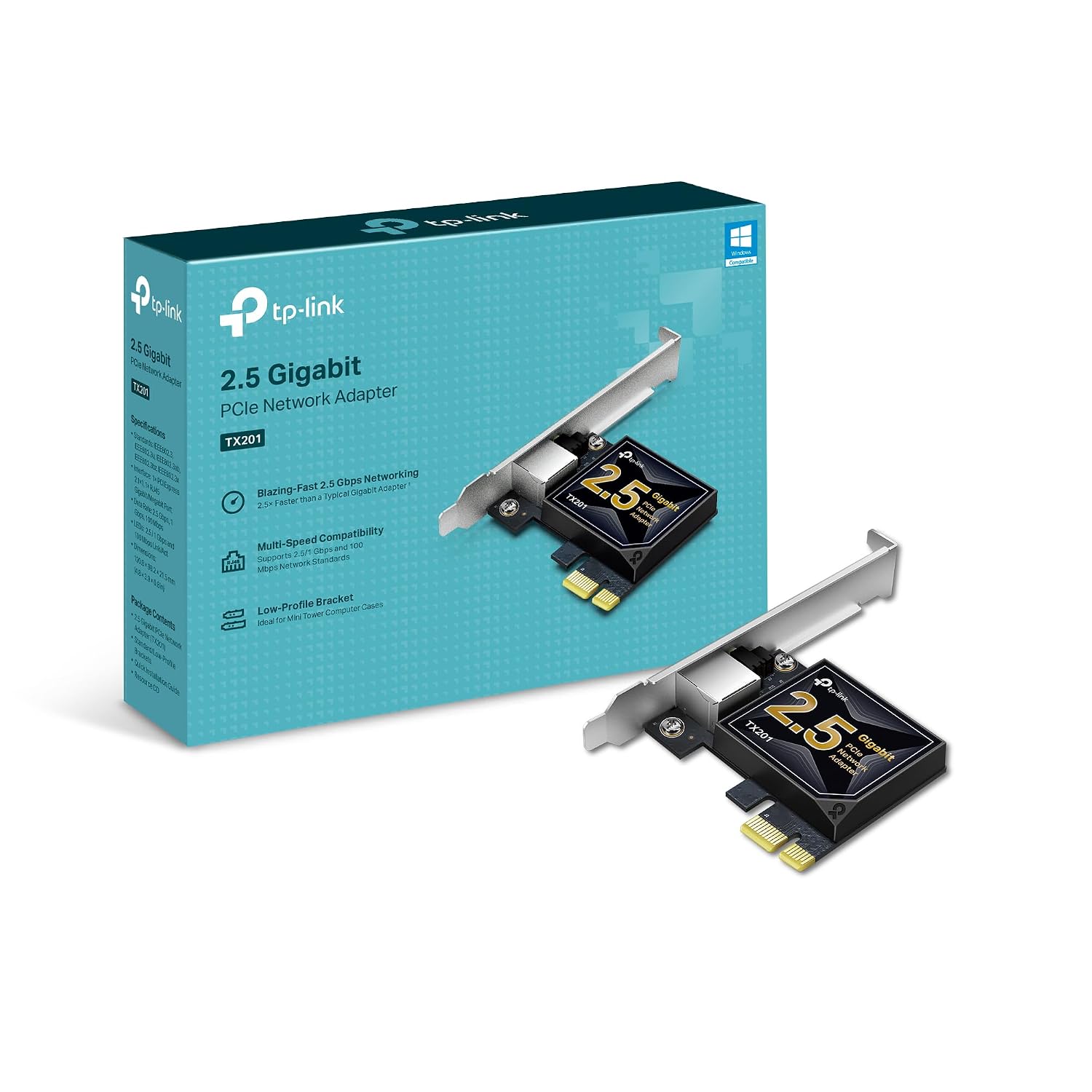
خرید کارت شبکه ۲٫۵ گیگابیتی تیپیلینک TP-Link مدل TX201 مشکی از میکرولس. [مشخصات فنی] کارت شبکه 2.5 گیگابیتی PCIe: با فناوری 2.5G Base-T، TX201 سرعت بالایی تا 2.5 گیگابیت در ثانیه ارائه میکند که
25GB PCIe Network Card TX201 PCIe to 25 Gigabit Ethernet Network Adapter Supports Windows 11108187 Win Server 202220192016 Linux
وزن
0.05 کیلوگرم
کارت شبکه 2.5 گیگابیتی PCIe: با فناوری 2.5G Base-T، TX201 سرعت بالایی تا 2.5 گیگابیت در ثانیه ارائه میکند که 2.5 برابر سریعتر از آداپتورهای معمولی گیگابیتی است و انتقال دادهها را هم برای دسترسی به اینترنت و هم برای انتقال دادههای محلی تضمین میکند. سازگاری همه کاره - آداپتور شبکه اترنت با سرعت های داده چندگانه (2.5 گیگابیت در ثانیه، 1 گیگابیت در ثانیه، 100 مگابیت در ثانیه اتصال پایه-T) سازگار است. پورت اترنت 2.5G به طور خودکار بین اتصال با سرعت بالاتر و پایین تر مذاکره می کند. QoS: فناوری کیفیت خدمات، عملکرد اولویتبندیشده را برای گیمرها ارائه میکند و تضمین میکند که از تراکم شبکه برای بازیهای رایانه شخصی جلوگیری شود. Wake on LAN – رایانه خود را از راه دور با WOL روشن یا خاموش کنید، به مدیریت آسانتر دستگاههایتان کمک میکند. براکت های با مشخصات کم و تمام قد: علاوه بر براکت استاندارد، یک براکت با مشخصات پایین برای کیس های کامپیوتر مینی تاور در نظر گرفته شده است. پشتیبانی جامع سیستم - کارت اترنت PCIe به طور کامل با ویندوز 11/10/8.1/8/7، سرورهای ویندوز 2022/2019/2016 و لینوکس سازگار است تا نیازهای مختلف سیستم عامل شما را برآورده کند. گارانتی 2 ساله پیشرو در صنعت و پشتیبانی فنی رایگان 24/7
قیمت :
فروشگاه :

وزن
0.05 کیلوگرم
کارت شبکه 2.5 گیگابیتی PCIe: با فناوری 2.5G Base-T، TX201 سرعت بالایی تا 2.5 گیگابیت در ثانیه ارائه میکند که 2.5 برابر سریعتر از آداپتورهای معمولی گیگابیتی است و انتقال دادهها را هم برای دسترسی به اینترنت و هم برای انتقال دادههای محلی تضمین میکند. سازگاری همه کاره - آداپتور شبکه اترنت با سرعت های داده چندگانه (2.5 گیگابیت در ثانیه، 1 گیگابیت در ثانیه، 100 مگابیت در ثانیه اتصال پایه-T) سازگار است. پورت اترنت 2.5G به طور خودکار بین اتصال با سرعت بالاتر و پایین تر مذاکره می کند. QoS: فناوری کیفیت خدمات، عملکرد اولویتبندیشده را برای گیمرها ارائه میکند و تضمین میکند که از تراکم شبکه برای بازیهای رایانه شخصی جلوگیری شود. Wake on LAN – رایانه خود را از راه دور با WOL روشن یا خاموش کنید، به مدیریت آسانتر دستگاههایتان کمک میکند. براکت های با مشخصات کم و تمام قد: علاوه بر براکت استاندارد، یک براکت با مشخصات پایین برای کیس های کامپیوتر مینی تاور در نظر گرفته شده است. پشتیبانی جامع سیستم - کارت اترنت PCIe به طور کامل با ویندوز 11/10/8.1/8/7، سرورهای ویندوز 2022/2019/2016 و لینوکس سازگار است تا نیازهای مختلف سیستم عامل شما را برآورده کند. گارانتی 2 ساله پیشرو در صنعت و پشتیبانی فنی رایگان 24/7
بر اساس نظرات آمازون
نظر شما میتونه به بقیه کمک کنه تا انتخاب بهتری داشته باشن خوشحال میشیم اگر تجربه تون از این محصول رو با ما به اشتراک بذارید!
نمایش ۶ نظر آمازون از ۲٬۱۸۹ نظر
Good Value Product
excellent product, onboard nics cant handle jitter as these do!
works on truenas scale
works great on my truenas scale with nuc 9 extreme
Muy mala calidad
Muy mala calidad!, se pierde la conectividad a cada rato!
Simple 2.5G upgrade, but don't forget the Realtek drivers!
I picked this up to finally get the most out of my high-speed internet plan. Most motherboards are still stuck with standard 1G ports, and this card is a very affordable way to bridge that gap. The Setup: Installation was a breeze. It’s a small card that fits easily into a PCIe x1 slot, and it even includes a low-profile bracket if you’re working with a slim desktop case. It’s built well and feels like a quality piece of hardware that should last. One Important Tip: When I first plugged it in, Windows recognized it immediately, but I noticed a weird issue: my download speeds were great, but my upload speeds were stuck and wouldn't hit that 2.5G mark. I found that the "standard" drivers Windows installs automatically aren't quite enough. To fix this and truly unlock the full 2.5G upload speed, go directly to the Realtek website and download the latest drivers for the RTL8125 chipset. As soon as I installed the official drivers from the source, the upload cap vanished and everything worked perfectly. Final Verdict: It’s a fantastic, reliable card for the price. Just save yourself the troubleshooting time and grab the drivers from Realtek right away
Fast, Stable Network Upgrade with Great Value
This TP-Link TX201 2.5GB PCIe network card has been a solid upgrade overall. Installation was very straightforward—just plug it into a PCIe slot, install the drivers, and it was up and running quickly without any issues. In terms of appearance, it has a clean, compact design that fits nicely inside a desktop without taking up unnecessary space or looking bulky. It blends in well with the rest of the components once installed. While I’m using it alongside a Wi-Fi setup rather than strictly wired Ethernet, the system still feels very stable, and I’ve noticed no connection issues or drops. Latency has been consistent and smooth during general use, gaming, and streaming, with everything feeling responsive. The value is really strong for what you get—this is a reliable, future-ready upgrade that offers a noticeable performance improvement potential if you’re moving to faster wired networking later on. Funny enough, I originally bought it for myself, but my boyfriend ended up taking it for his setup because he liked it so much more. Pros: Easy installation and setup Stable, consistent performance Low latency and responsive connection Clean, compact appearance Great value for a 2.5GbE upgrade Cons: Best performance requires wired Ethernet setup Needs a free PCIe slot Tips: Keep drivers updated for best stability and performance Ideal for gaming or future-proofing a PC build Great upgrade if moving from standard gigabit networking Overall, this is a high-quality, affordable networking upgrade that delivers stability, low latency, and strong value—even if you’re not immediately using it at full wired speed.
Amazing performance
I have one PC with onboard Ethernet using the Intel I225-V (2.5Gbps). Then I have another PC that I transfer files to and fro and wanted faster speeds. I already have a 2.5Gbps switch by TP-Link. So, I installed this in the second PC, immediately downloaded and installed the latest drivers from Realtek and put it to work. PC w/ Intel I225-V + PC w/ TX201 (RTL8125B) > 2.5Gbps switch (which is connectetd to my router's 1Gbps Ethernet port). So, I get 2.5Gbps on LAN, but will be limited to 1Gbps WAN due to my router (Asus RT-AXE7800). Jumbo Frames enabled @ 9014 bytes. Working perfectly as tested in command prompt with 8000+ byte packet pings. SMB file sharing transfer speeds are 295-298 MB/s! I didn't expect that. It makes... a HUGE difference in transfer speeds when you're sending 150GB, 200GB and larger files over LAN to backup. I used to watch a specific file I'd send back and forth that was 9GB and I had time to open Task Manager and HWiNFO64 and just inspect how the speeds were going. With 2.5Gbps speeds? It's done too quick to even get a good peek at what's going on haha. I'm not having any issues at all with it. No throttling for me as of yet, so it seems to run cool enough to deliver max performance. I like TP-Link products and spent the extra for this one over one of the alphabet soup named companies which I don't trust. This one uploads and downloads over Windows 11 file sharing (SMB) at 295-298MB/s every time. Up and Down. That's important. AND it's important to recognize I'm talking about file sharing with SMB overhead... NOT iPerf3 speeds. I should get higher speeds over iPerf3, but I haven't even tested that yet. 100% stability, easy to install, fits easily in my SFF case on my little home "server" PC. Great product.