


Iftikhar H.
Reviewed in the United Arab Emirates on 18 December 2025
Very high quality product
The product was delivered after a bit of a mishap from Amazon but the product was worth the effort put to retrieve it.
5.0
۲۶۷٬۳۴۴٬۰۰۰ تومان
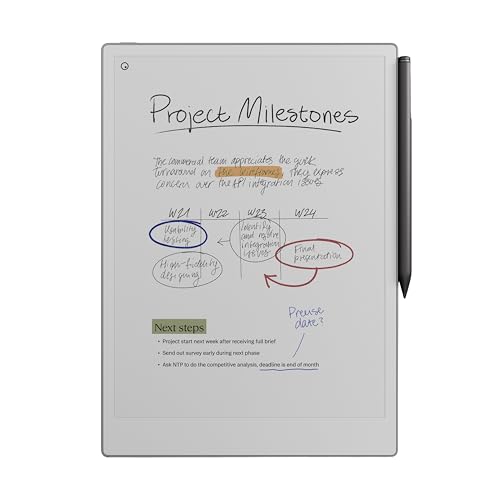
خرید قلم نوری reMarkable Paper Pro مدل RM81C-1000NW خاکستری از میکرولس. [مشخصات فنی] - برند: قابل توجه - رنگ: خاکستری - مواد: پلاستیک / پلیمر - کاربردهای پیشنهادی برای محصول: دفتر - اجزای شامل شده:
reMarkable Paper Pro Bundle – Includes 11.8” reMarkable Paper Tablet, and Marker Plus Pen with Eraser | 11.8 inch paper tablet with colour display and reading light, digital e-ink notebook for thinking, writing and reading
وزن
0.526 کیلوگرم
عیب یابی اطلاعات و راهنمای محصول بسیاری از نگرانی های مربوط به قابلیت استفاده را می توان از طریق تنظیمات اولیه تنظیمات حل کرد: تجربه نوشتن: کاربران می توانند انواع قلم و ابزارهای نوشتن را در تنظیمات تغییر دهند تا احساس نوشتن را بهبود بخشند. ابزار پیشفرض ممکن است با اولویت هر کاربر مطابقت نداشته باشد. پاسخگویی صفحه نمایش: تبلت برای حداقل حواس پرتی و تأخیر بهینه شده است. با این حال، اگر صفحه نمایش کند به نظر می رسد، راه اندازی مجدد و به روز رسانی سیستم عامل اغلب آن را حل می کند. سازگاری OneDrive: کاربران باید از توسعه دهنده اطمینان حاصل کنند لوح کاغذی نهایی - برای اولین بار در یک تبلت کاغذی قابل توجه، می توانید رنگی بنویسید، طرح بزنید و بخوانید. فوق العاده باریک و قابل حمل، اما با صفحه نمایش رنگی 11.8 اینچی با اندازه کامل، نور مطالعه قابل تنظیم و تجربه نوشتن کاغذ مانند بی بدیل آنچه در جعبه وجود دارد - ReMarkable Paper Pro، یک نوت بوک دیجیتال برای نوشتن بی سابقه مانند کاغذ با نمایشگر Canvas Color 11.8 اینچی، Marker Plus، خودکار قابل توجه با پاک کن داخلی، 6 نوک نشانگر یدکی و کابل USB-C را خواهید یافت. نوشتن کاغذ مانند - طراحی شده برای کار منحصراً با صفحه نمایش رنگی پیشگامانه برای ارائه اصطکاک واقعی و احساس طبیعی نوشتن، نشانگر پلاس شامل کنترل دقیق، پاسخگویی باورنکردنی و راحتی تمام روز را ارائه می دهد. همه کارهای شما، سازماندهی شده - یادداشت ها و اسناد خود را با پوشه ها و برچسب ها مرتب کنید، مستقیماً روی PDF بنویسید و فوراً دست خط را به متن تایپ شده تبدیل کنید. همه چیز در یک مکان است و به راحتی پیدا می شود با خیال راحت بخوانید. روز یا شب – برخلاف اکثر لپتاپها و تلفنها، ReMarkable Paper Pro دارای صفحهنمایش کمنور است که نور طبیعی را منعکس میکند، بنابراین میتوانید بدون خستگی چشم، حتی در خارج از خانه، مطالعه کنید. یک چراغ مطالعه قابل تنظیم به این معنی است که می توانید در زمان خاموش شدن چراغ ها نیز به کار خود ادامه دهید
قیمت :
فروشگاه :

وزن
0.526 کیلوگرم
عیب یابی اطلاعات و راهنمای محصول بسیاری از نگرانی های مربوط به قابلیت استفاده را می توان از طریق تنظیمات اولیه تنظیمات حل کرد: تجربه نوشتن: کاربران می توانند انواع قلم و ابزارهای نوشتن را در تنظیمات تغییر دهند تا احساس نوشتن را بهبود بخشند. ابزار پیشفرض ممکن است با اولویت هر کاربر مطابقت نداشته باشد. پاسخگویی صفحه نمایش: تبلت برای حداقل حواس پرتی و تأخیر بهینه شده است. با این حال، اگر صفحه نمایش کند به نظر می رسد، راه اندازی مجدد و به روز رسانی سیستم عامل اغلب آن را حل می کند. سازگاری OneDrive: کاربران باید از توسعه دهنده اطمینان حاصل کنند لوح کاغذی نهایی - برای اولین بار در یک تبلت کاغذی قابل توجه، می توانید رنگی بنویسید، طرح بزنید و بخوانید. فوق العاده باریک و قابل حمل، اما با صفحه نمایش رنگی 11.8 اینچی با اندازه کامل، نور مطالعه قابل تنظیم و تجربه نوشتن کاغذ مانند بی بدیل آنچه در جعبه وجود دارد - ReMarkable Paper Pro، یک نوت بوک دیجیتال برای نوشتن بی سابقه مانند کاغذ با نمایشگر Canvas Color 11.8 اینچی، Marker Plus، خودکار قابل توجه با پاک کن داخلی، 6 نوک نشانگر یدکی و کابل USB-C را خواهید یافت. نوشتن کاغذ مانند - طراحی شده برای کار منحصراً با صفحه نمایش رنگی پیشگامانه برای ارائه اصطکاک واقعی و احساس طبیعی نوشتن، نشانگر پلاس شامل کنترل دقیق، پاسخگویی باورنکردنی و راحتی تمام روز را ارائه می دهد. همه کارهای شما، سازماندهی شده - یادداشت ها و اسناد خود را با پوشه ها و برچسب ها مرتب کنید، مستقیماً روی PDF بنویسید و فوراً دست خط را به متن تایپ شده تبدیل کنید. همه چیز در یک مکان است و به راحتی پیدا می شود با خیال راحت بخوانید. روز یا شب – برخلاف اکثر لپتاپها و تلفنها، ReMarkable Paper Pro دارای صفحهنمایش کمنور است که نور طبیعی را منعکس میکند، بنابراین میتوانید بدون خستگی چشم، حتی در خارج از خانه، مطالعه کنید. یک چراغ مطالعه قابل تنظیم به این معنی است که می توانید در زمان خاموش شدن چراغ ها نیز به کار خود ادامه دهید
بر اساس نظرات آمازون
نظر شما میتونه به بقیه کمک کنه تا انتخاب بهتری داشته باشن خوشحال میشیم اگر تجربه تون از این محصول رو با ما به اشتراک بذارید!
نمایش ۱۱ نظر آمازون از ۱٬۰۱۹ نظر
Very high quality product
The product was delivered after a bit of a mishap from Amazon but the product was worth the effort put to retrieve it.
Kind of must have
Expensive, but it's an amazing product.
Unpolished beta release that seems to suffer extreme ghosting
The device suffers severe ghosting affects to the point where it is hard to even click menus or close documents. Even after resets and changing page it is quick to return to being ghosting. The writing experience is fairly nice when it works, but really it feels like a beta experimental device rather than a polished product ready for market.
Warranty
There is issues charging pls advice for warranty
Unsatisfactory Experience – Beware Before Buying
I received the item in proper new packaging, but unfortunately, its performance did not meet my expectations. I requested a return, and while the request was initially accepted, the return was later rejected because I had opened the package. I was then offered only two options: receive a 50% refund or have the item sent back to me. This was disappointing, as my return was due to poor product performance, not any damage or misuse. Overall, a frustrating experience and not what I expected from a reputable seller
Not starting
Paper pro is not starting. It's just hung at it's starting
A Premium Paper-Like Tablet That Redefines Digital Note-Taking
The reMarkable Paper Pro delivers an exceptional writing and reading experience that truly lives up to its reputation as a “paper tablet.” The large 11.8-inch colour display feels natural on the eyes, and the integrated reading light makes it comfortable to use in any environment, day or night. Writing with the included Marker Plus pen is smooth and highly responsive, closely mimicking the feel of pen on paper, which makes note-taking, sketching, and annotating documents genuinely enjoyable. What sets the reMarkable Paper Pro apart is its focus and simplicity. Free from distractions, it’s ideal for professionals, students, and creatives who want to think, read, and write more clearly. The colour display adds real value for highlighting, diagrams, and PDFs, while the premium build quality makes it feel like a serious productivity tool rather than just another tablet. If you’re looking for a refined, purpose-built device that replaces notebooks and paper clutter, this is a standout choice.
I Wish I Bought It Sooner!
I am someone who takes a lot of notes and makes a lot of lists. I have pads of paper and scraps of paper everywhere, both at home and in my office. I liked the idea of this electric notepad to always have a place to take as many notes as I want and to have plenty of room to make the list as long as it needs to be. I also like having them all in the same place as I won't lose them. I love being able to have a hand written list converted to text, though I believe you have to have a subscription to the reMarkable app for this to work. You get a short free trial, though I went ahead and committed to a year long subscription at a reduced cost (versus monthly) as I like the idea of being able to transfer my notes between my reMarkable and both my personal laptop and my business laptop (you are required to download the desk top app to do this).. Yes, this electronic notebook is expensive, especially for my primary use. But I have found it to be very worthwhile in the two weeks that I have had it. I am less concerned with the feel of the pen on the screen. That isn't a sensation that I necessarily needed to have. It feels fine but isn't why I purchased this. To me, there is no real noticeable lag in writing and the text appearing on the screen. If you erase something, yes, the screen refreshes but I don't find that to be a hindrance and it really only takes a moment for the page to refresh. Some of the features I absolutely love are illustrated in the short video I am posting with this review. The eraser is great to have for small changes. Being able to select a section and erase that larger area is fantastic. Then, being able to select a section and move it around the page is great, too. I have downloaded a couple of the templates, specifically the calendar templates but I have not yet explored other templates that may be helpful. I also have not yet imported a PDF to edit and look forward to trying that out. I haven't even read the getting started guide yet. As soon as I
Super producto
increíble producto antes escribir en Goodnotes en el iPad y la verdad es que no tiene punto de comparación, es como escribir en papel increíble producto
A very professional device that is what it is designed for without all the bells and whistles.
The reMarkable Paper Pro is a wonderful device and thus far I am loving using it. I love the size of the device, one of the main reasons I opted for the reMarkable Paper Pro and that it is dedicated for note taking and organising into individual folders, tagging pages, etc. Although you need to download and install an individual app on the computer for reMarkable, it's fairly straight forward, and adding PDF files if you have any eBooks in that format or ePub you can easily drag and drop across. For that, it is pretty decent compatibility with eBooks, just not for many of the other formats, unfortunately, but I'm not overly fussed on that as I use my Kindle Paperwhite for reading use. You'll find that if you use the device on full brightness, it's a pretty decent amount of light, you'd see that in person rather than from videos. However, intensive use that I use it for taking down a lot of notes from videos for my language learning, the battery will go down over the course of a day. I've used it just using a normal light and the backlight of it set to zero and it worked great. I had also done research and you can use the device whilst plugged into the laptop whilst it charges, it doesn't have any effect on the life of the battery. So long as you use it from time to time mostly away from charging to allow the battery to recycle, you're fine. The device for functionality is straightforward; learning to draw straight lines you just draw a line and if you hold it, it'll do it automatically, same for circles. Learning the menus are pretty straightforward, and creating a new notebook, don't confuse it as a page, you can create pages within notebooks, check the three dots menu and you'll find it there. I've found the quality of the screen to be fantastic, the device is very professional looking, I haven't had any issue with the light bleeding as some may have complained, I think it looks fantastic, it's a very textured feeling with writing and drawing anything. Whilst it i
Fine product
It's a fine product. Good value for money. Easy to use. Good battery life. Highly recommend