رتبه پرفروش ها#109,181 در رایانه (به 100 برتر در رایانه مراجعه کنید)#2,612 در مانیتورهای رایانه
نظرات مشتریان4.14.1 از 5 ستاره (293) 4.1 از 5 ستاره
فناوری اتصالDisplayPort، HDMI
امتیاز و نظرات
4.1
۲۹۳نظر
بر اساس نظرات آمازون
نظر شما میتونه به بقیه کمک کنه تا انتخاب بهتری داشته باشن خوشحال میشیم اگر تجربه تون از این محصول رو با ما به اشتراک بذارید!
نمایش ۵ نظر آمازون از ۲۹۳ نظر
Shin
Reviewed in Canada on 14 July 2023
Amazing Value
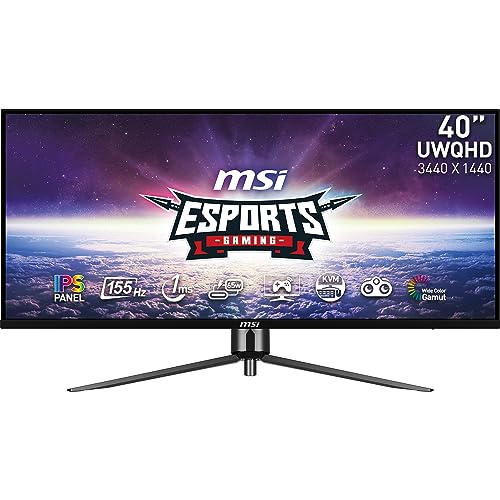
This monitor is kind of a stealth deal. A 40 inch, IPS ultrawide for less than half of most of its competitors. Almost all of which are VA panels. Whether it's flatness is a pro or con to you, it depends. I don't mind it. But I've never used a curved monitor. There isn't much difference between this IPS and my old 1080p Asus Designo 27in in terms of colour accuracy and it has the benefit of higher refresh rate. I play a lot of Driving/Flying/Train sim games and some other genres as well and this monitor is perfect. Very immersive experience at the distance it sits from me. The contrast ratio is really good for an IPS without crushing the blacks and the light bleed is fairly uniform and unobtrusive. I didn't notice any ghosting, though I'm sure it exists. The stand is well-engineered, perhaps even overengineered. It's very solid, but requires eight screws in total to assemble. The tilt....works but it's extremely tight and does not tilt down. Also my panel had absolutely no dead pixels! Cons: Mystic Light LEDS are so dim they might as well not exist. The navi button broke within an hour of owning the monitor and I somehow shoved the whole thing into its hole with not much force, making the OSD useless. Luckily, this monitor will accept MSI's gaming OSD software which has all the onboard OSD functions anyway. So this is really largely a non-issue and I didn't want to RMA a 40 inch widescreen, that'd be a headache. sRGB mode looks fantastic, the other modes tend to lean towards heavier saturation. If you LIKE saturation-forward stuff, this monitor is great. However if you're going to stick in sRGB mode for artwork for the accuracy, the nits are somewhere between 300-350ish and that's a little dim. You can get closer to 400 by cranking the brightness but that'll start washing stuff out and balancing it with contrast and such will heavily saturate. I like heavy saturation while gaming and the lower brightness doesn't bother me too much in this space. But in a bright room
5.0
Dannythel
Reviewed in Mexico on 30 July 2023
Excelente por el precio
Para el precio, 40 pulgadas uwqhd (3440x1440) está muy bien, es un IPS a 144hz que se puede hacer OC a 155hz (120hz con cable USBC) personalmente no lo hago ya que la diferencia no de nota y te bloquea algunos settings del monitor, HDR también es bastante bueno. El monitor es GRANDE, no lo aparenta en las fotos pero lo es, así que necesitas un escritorio o un área grande para disfrutarlo. Totalmente recomendable ponerlo en un brazo al escritorio o a la pared ya que la altura es estatica. Cómo opinión personal, si tienes una tarjeta de video que soporta resolución dinámica, pon una resolución mayor y creo que se le saca mejor provecho , yo lo tengo en una PC con una amd 7900xt y lo tengo a una resolución de 5120x2160 y me da la impresión que se disfruta mucho más el tamaño real del monitor. Si fuera curvo sería un plus bastante interesante pero no es necesario. Ciertamente se calienta un poco pero nada de que preocuparse 100% recomendable
5.0
ObsidianSage
Reviewed in the United States on 5 May 2024
Underrated budget gem
This monitor is seriously great. I was torn between a handful of ultrawides but opted for this one as going to larger panels (49" and above) results in less vertical space and more horizontal space. Transitioning from my previous 32" 1440p panel to this was a breeze as they essentially share the same height. I like this monitor enough that I have a second one on the way to stack them up for work. Only glaring downside to be found is the stand is abysmal. Seriously. Don't buy this unless you also plan to grab a mount or have one that can support this panel, but a serviceable one can be had for $30-$50. Side note: I'd avoid any monitor mount that has a quick disconnect feature where the monitor connects to the arm via the slide and thumbscrew design, as the weight and size of this monitor will most likely cause a small amount of droop at the connection that is hard to alleviate. There are a lot of these out there, so reading assembly instructions or looking at customer photos/product photos first will save a lot of headache. I would opt for a simpler design that directly connects to the back of the panel via screws or go premo and get an Ergotron or similar quality arm. I'm currently using VIVO mounts, specifically the ones that mount the monitor to the plate w/ 4 screws and have had no issues with droop or sagging. (STAND-V001T for reference) OSD menus are fine, if a little slow to navigate, but you're going to most likely set it up once or twice, and then rarely, if ever, dive back in. Picture looks great in SDR and has almost eye searing brightness at 100%. IPS panel is actually an IPS-ADS panel made by a company called BOE. There are some alleged refinements over a traditional IPS and while I'm not at liberty of being able to make a direct comparison, I will say colors, viewing angle, and motion on the panel look great. No perceived ghosting for myself, personally. No backlight bleed whatsoever and that's highly impressive to me as I had a few years run with VA pa
5.0
Nikhil
Reviewed in Canada on 5 October 2026
Good. Until something else takes it's spot.
Alright - I have this monitor for a few days. I will refrain from comparing and contrasting (fore shadowing) it with a 34 inch 1440p ultrawide. The PPI on this is ever so slightly lower it is noticeable but not by much. However my main gripe with this monitor is that it for this size it should be curved. Going from a curved/flat 34 inch ultrawides to a flat 40 ultrawide makes the distance between the center of the screen and the edges more noticeable. This can be an issue as it can give that fish eye perspective that can take some time to get used to. My second issue with this monitor is more so the marketing - the state the monitor is 155hz with DP overclocking. How much this will stress the controller/panel is subject to your unit. The picture quality is quite good considering its mediocre contrast ratio. This will not give you a true HDR experience - it is fine nothing to speak home about. The response time is quite standard, 1ms MPRT - I wish they also listed the GTG as well but I assume its about the same since its an IPS panel. Mine spectacularly failed with half the screen only lighting up. Granted this is a backlight issue and may have only been my unit. I can see this monitor being difficult to find components post the warranty period as the blacklight strip may not be a common SKU/part. Speaking of warranty - I don't understand how its fair that manufacturers like MSI (ASUS, Asrock, Gigabyte etc.) would have you pay shipping for an RMA when it more money out of a customer after paying full listed price for a product. Sadly there was not much stock of this monitor and would have liked to keep my unit if the RMA was of no cost to me. Will be returning it as I just don't think its fair especially when its less of an incentive when I have to fork money out for a warranty repair. Additionally, I had observed this - my box was actually opened despite it being listed as new. The seal was already cut. I am unsure what to make of it. Its not ideal when an open box
4.0
Mr. Tennisballface
Reviewed in the United States on 1 December 2025
UW 40 inch that is perfect for desks. It's smooth for games/movies. One stuck pixel, however.
I adore this monitor! This is the best price-to-quality display on the market. There's no arguing that! I spent about 6+ months keeping my eye on it, and I was fortunate to buy one in mid-October. I wasn't able to set it up until last week. I'm blown away with how rich the colors are for games. I've been playing WoW, The Last of Us Part I, Forza Horizon 5, Oblivion Remastered. They all make FULL use of the 20:9, and it's just incredible how rich the colors are. I just have one TEENY WEENY problem. I have what looks to be a stuck red pixel. I want to know from an expert, someone who has this monitor, or preferably, from MSI, what you'd recommend doing to bring this pixel to life! I believe it is stuck, not dead. It could just be one, or it could be a few in a tight, singular region. Any help would be great! P.S. The screen size finally makes use of my desk's real estate. It's an older wooden desk, and it's large enough to watch movies, from 10-15 feet away! The refresh rate makes video and games look naturally smooth, unlike some screens that tend to make movies look cheaper, less cinematic (at higher Hz). Setting it up was little trouble. The stand is good, though my monitor is slightly tilted, given the off placement of the holes-to-screws.