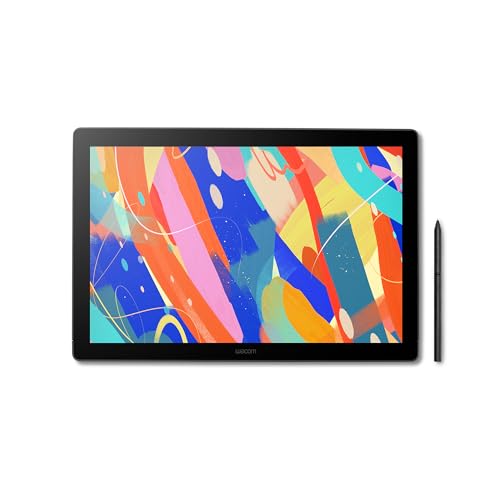
تبلت طراحی Wacom Cintiq 16 با نمایشگر QHD و قلم Pro Pen 3، مدل DTK168K0A
تبلت طراحی Wacom Cintiq 16 با نمایشگر QHD و قلم Pro Pen 3، مدل DTK168K0A
Wacom Cintiq 16, Drawing Tablet with QHD Screen & Pro Pen 3
برند: Wacom
مشخصات فنی
نام تجاری
Wacom
فناوری اتصال
کابل USB-C برای اتصال به رایانه های Windows/Mac با DisplayPort Alt Mode یا Thunderbolt 3 یا 4 ورودی (کامپیوترهای بدون ورودی DP Alt یا TB 3 یا 4 به کابل های اضافی نیاز دارند) بیشتر ببینید
حساسیت به فشار
8192 سطح
سیستم عامل
Android 8.0 و بالاتر، ویندوز 10 یا بالاتر، macOS 13 یا بالاتر
ویژگی های خاص
16 اینچ IPS LCD، پشتیبانی از شیب 60 درجه، عمق رنگ 8 بیتی، شیشه ضد تابش، پایه های تاشو داخلی
درباره محصول
کانواس خلاقانه همهجانبه: صفحه نمایش 16 اینچی IPS با وضوح 2.5K WQXGA (2560 x 1600) تصاویری واضح، واضح و دقیق را برای هنر و طراحی دیجیتال ارائه می دهد.
بهترین فناوری قلم WACOM: Pro Pen 3 با 8192 سطح فشار به سبک ترین لمس شما پاسخ می دهد. شامل پشتیبانی از شیب، 3 کلید میانبر برای دسترسی به ابزار، و نگهدارنده ای که در دو طرف نمایشگر با زاویه قابل تنظیم برای دسترسی سریع قرار می گیرد.
نمایش رنگی سینمایی: پوشش 99% DCI-P3 و 100% sRGB با عمق رنگ 8 بیتی، طیف رنگی گسترده ای را ارائه می دهد که در نمایشگرهای مدرن و رسانه های دیجیتال استفاده می شود - آثار هنری خود را همانطور که قرار است مشاهده کنید ببینید.
آماده برای ایجاد: پایه های تاشو داخلی زاویه کار 20 درجه را فراهم می کند یا برای راحتی شخصی، پایه قابل تنظیم خریداری کنید.
اتصال: شامل کابل USB-C برای اتصال به رایانههای Windows/Mac با حالت DisplayPort Alt یا ورودی Thunderbolt 3 یا 4 (رایانههای بدون ورودی DP Alt یا TB 3 یا 4 به کابلهای اضافی نیاز دارند)
جدول مشخصات
نام تجاریWacom
فناوری اتصالکابل USB-C برای اتصال به رایانه های Windows/Mac با DisplayPort Alt Mode یا Thunderbolt 3 یا 4 ورودی (کامپیوترهای بدون ورودی DP Alt یا TB 3 یا 4 به کابل های اضافی نیاز دارند) بیشتر ببینید
حساسیت به فشار8192 سطح
سیستم عاملAndroid 8.0 و بالاتر، ویندوز 10 یا بالاتر، macOS 13 یا بالاتر
ویژگی های خاص16 اینچ IPS LCD، پشتیبانی از شیب 60 درجه، عمق رنگ 8 بیتی، شیشه ضد تابش، پایه های تاشو داخلی
نام مدلWacom Cintiq 16
رسانه داخلیآداپتور برق متناوب، دو کابل USB-C به C، Wacom Pro Pen 3، پایههای تاشو داخلی
مخاطب هدف3D CAD، طراح، هنرمندان دیجیتال
شماره مدلDTK168K0A
تعداد آیتم ها1
سازندهشرکت فناوری Wacom
UPC753218984081
تعداد واحد1 شمارش
تعداد بسته ها1
شماره قطعه MfrDTK168K0A
رتبه پرفروش ها#93,345 در رایانه (به 100 برتر در رایانه ها مراجعه کنید)#249 در تبلت های گرافیکی
ASINB0CJMJZTG2
نظرات مشتریان4.64.6 از 5 ستاره (56) 4.6 از 5 ستاره
ویژگی های اضافی16 اینچ IPS LCD، پشتیبانی از شیب 60 درجه، عمق رنگ 8 بیتی، شیشه ضد تابش، پایه های تاشو داخلی
کاربردهای خاص محصولمدل سازی سه بعدی، انیمیشن، طراحی
کابل USB-C برای اتصال به رایانه های Windows/Mac با DisplayPort Alt Mode یا Thunderbolt 3 یا 4 ورودی (کامپیوترهای بدون ورودی DP Alt یا TB 3 یا 4 به کابل های اضافی نیاز دارند) بیشتر ببینید
حساسیت به فشار
8192 سطح
سیستم عامل
Android 8.0 و بالاتر، ویندوز 10 یا بالاتر، macOS 13 یا بالاتر
ویژگی های خاص
16 اینچ IPS LCD، پشتیبانی از شیب 60 درجه، عمق رنگ 8 بیتی، شیشه ضد تابش، پایه های تاشو داخلی
درباره محصول
کانواس خلاقانه همهجانبه: صفحه نمایش 16 اینچی IPS با وضوح 2.5K WQXGA (2560 x 1600) تصاویری واضح، واضح و دقیق را برای هنر و طراحی دیجیتال ارائه می دهد.
بهترین فناوری قلم WACOM: Pro Pen 3 با 8192 سطح فشار به سبک ترین لمس شما پاسخ می دهد. شامل پشتیبانی از شیب، 3 کلید میانبر برای دسترسی به ابزار، و نگهدارنده ای که در دو طرف نمایشگر با زاویه قابل تنظیم برای دسترسی سریع قرار می گیرد.
نمایش رنگی سینمایی: پوشش 99% DCI-P3 و 100% sRGB با عمق رنگ 8 بیتی، طیف رنگی گسترده ای را ارائه می دهد که در نمایشگرهای مدرن و رسانه های دیجیتال استفاده می شود - آثار هنری خود را همانطور که قرار است مشاهده کنید ببینید.
آماده برای ایجاد: پایه های تاشو داخلی زاویه کار 20 درجه را فراهم می کند یا برای راحتی شخصی، پایه قابل تنظیم خریداری کنید.
اتصال: شامل کابل USB-C برای اتصال به رایانههای Windows/Mac با حالت DisplayPort Alt یا ورودی Thunderbolt 3 یا 4 (رایانههای بدون ورودی DP Alt یا TB 3 یا 4 به کابلهای اضافی نیاز دارند)
جدول مشخصات
نام تجاریWacom
فناوری اتصالکابل USB-C برای اتصال به رایانه های Windows/Mac با DisplayPort Alt Mode یا Thunderbolt 3 یا 4 ورودی (کامپیوترهای بدون ورودی DP Alt یا TB 3 یا 4 به کابل های اضافی نیاز دارند) بیشتر ببینید
حساسیت به فشار8192 سطح
سیستم عاملAndroid 8.0 و بالاتر، ویندوز 10 یا بالاتر، macOS 13 یا بالاتر
ویژگی های خاص16 اینچ IPS LCD، پشتیبانی از شیب 60 درجه، عمق رنگ 8 بیتی، شیشه ضد تابش، پایه های تاشو داخلی
نام مدلWacom Cintiq 16
رسانه داخلیآداپتور برق متناوب، دو کابل USB-C به C، Wacom Pro Pen 3، پایههای تاشو داخلی
مخاطب هدف3D CAD، طراح، هنرمندان دیجیتال
شماره مدلDTK168K0A
تعداد آیتم ها1
سازندهشرکت فناوری Wacom
UPC753218984081
تعداد واحد1 شمارش
تعداد بسته ها1
شماره قطعه MfrDTK168K0A
رتبه پرفروش ها#93,345 در رایانه (به 100 برتر در رایانه ها مراجعه کنید)#249 در تبلت های گرافیکی
ASINB0CJMJZTG2
نظرات مشتریان4.64.6 از 5 ستاره (56) 4.6 از 5 ستاره
ویژگی های اضافی16 اینچ IPS LCD، پشتیبانی از شیب 60 درجه، عمق رنگ 8 بیتی، شیشه ضد تابش، پایه های تاشو داخلی
کاربردهای خاص محصولمدل سازی سه بعدی، انیمیشن، طراحی
دستگاه های سازگارمک / کامپیوتر
نوع نمایشگرLCD
وضوح بومی2560x1600
اندازه صفحه نمایش16 اینچ
وزن مورد2.04 کیلوگرم
ابعاد مورد L x W38.4 لیتر در 25.9 وات سانتی متر
سطح فعال13.6 در 8.5 اینچ
رنگمشکی
امتیاز و نظرات
4.6
۵۶نظر
بر اساس نظرات آمازون
نظر شما میتونه به بقیه کمک کنه تا انتخاب بهتری داشته باشن خوشحال میشیم اگر تجربه تون از این محصول رو با ما به اشتراک بذارید!
نمایش ۵ نظر آمازون از ۵۶ نظر
Jose
Reviewed in the United States on 13 August 2026
High Quality Wacom
I've had this for just a bit over a weekend and I'm already in love. First screen tablet in my 20 years of drawing with screenless Wacom tablets and it's been a joy. The colors have been callibrated just to my liking out of the box, barely any lag when drawing, and the image on the screen looks great in general and feels good to draw on. Size is perfect for me as well. Fits right on my desk alongside my already busy setup. Only complaint is the recent nickle and diming Wacom has succumbed to. Only coming with a USBC cable and no miniHDMI to HDMI/USBC to USBA cables. Pro Pen 3 is divise. I find it extremely uncomfortable unlike the Pro Pen 2, so you're practically forced to pay more for the extra grip types. But I'm still in love with it. In an extremely competitive market with Huion and XP-Pen making solid tablets of their own, Wacom still comes out on top just for how high quality their products are.
5.0
james
Reviewed in the United States on 27 February 2026
Closest to a perfect drawing tablet Ive used (but has some annoyances)
This is the best digital drawing experience ive ever enjoyed! This tablet feels amazing to draw on. There basically 0 anti-glare sparkle, the display is gorgeous, crisp and easy on the eyes (and works great for non-art things when you arent drawing). The device itself is built like a brick and i have a feeling it'll last a long time. Ive been using it daily for 2+ months and ive noticed no issues or markings on the display. I also appreciate how the tablet settings UI is configured with the tablet pen which is very intuitive and comfortable. As for negatives these were the biggest issues ive noticed (none of which involve the actual tablet): - The pen.. is not very good. I didnt like it. Ive just been using my pro pen 2 that i had with my intuos. This pro pen 3 is very uncomfortable for me with its very slim form factor as somebody who is prone to wrist cramps. The buttons also require way too much force to be comfortable. The pro pen 2 is still a perfect tablet pen and i have no clue why they downgraded it so hard for the new model, including getting rid of the eraser end. It also doesnt include the accessories (like the weight and buttons) you would normally get if you bought the pen individually. Dumb penny pinching. - No stand. I feel like any tablet over $500 should automatically come with a stand. Not a huge deal, but still noteworthy. More penny pinching. - No mini-hdmi. Seriously? Its basically a requirement to use the device since most computers dont support the display-usb mode. A mini hdmi cable costs less than $10 dollars so this also feels especially greedy. Yet more penny pinching. If youre familiar with wacom these penny pinching practices wont come as a surprise but they are still notable. Despite my complaints i do still love this tablet and ive been enjoying drawing on it everyday. But you should consider these things as well when purchasing- especially the fact you need to have a mini-hdmi cable ready. Overall im very happy with the device.
5.0
ryan newitt
Reviewed in the United States on 10 July 2026
Great size, great price.
Love this pen display! Color is very good and no hotspots.
5.0
Sara
Reviewed in the United States on 3 March 2026
Very awesome tablet!!
I love this drawing tablet sooo much! It's big and feels nice to draw on. The only thing is that it didn't have a mini HDMI included, so I had to go out and buy one separately. It's not very portable either if you were thinking about carrying it around with you places, but it's simple to set up.
5.0
Jtanimator
Reviewed in the United States on 1 December 2025
The glaze is insane, but this one's actually good
I'll preface by saying I think Wacom gets an insane amount of glaze from reviews who expect the least for the most amount of money. even the reviews listed on this site are for multiple generations of Cintiq's dating back 10 years, so make sure you're reading feedback for the newest 2025 model if you want to take them seriously. that being said, I think this is the first real value Wacom has offered in a 16" display for over a decade, or possibly ever. No matter what you do, make sure you avoid purchasing the older generation (labeled "pro pen 2" here on Amazon) at all costs, since it doesn't have a laminated display, has horrible resolution/colors, and requires an outrageous amount of cables connected to your computer to operate. this newer one fixes all those issues, with only 2 glaring problems remaining (or newly created): 1. there isn't a single customizable shortcut button on the display, although they easily COULD have fit them on the back of the display like the pro models do. 2. the pro pen 3 is quite frankly garbage. To clarify, the version they include with this display is especially garbage. despite being a $700 display, they skimp on every corner they can with the pen by only packing in the lightweight, cheap feeling, stripped down version of the pro pen 3 with no extra weights, grips or anything else with it. it feels cheap to use, and handles much worse than the far superior pro pen 2. Anyone who tells you otherwise would happily accept anything Wacom fed them. That being said, the tablet itself is overall pleasant to use. for the first time ever on a baseline display, this Cintiq is a crisp 2.5k resolution with a pleasant 16:10 aspect ratio, it has very nice colors fairly accurate to my MacBook Pro, and the visa mount allows this to be used with any monitor stand you can find on amazon. it feels high quality and comes in at a hefty weight I really like. And the little adjustable pen stand that connects to the display is a pretty clever touch I've app