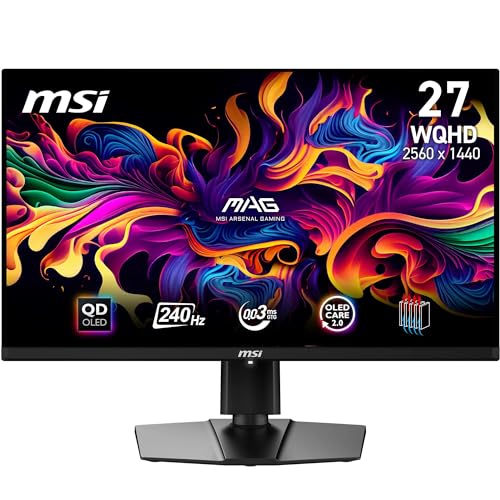
QUANTUM DOT OLED - مانیتور گیمینگ MSI MAG 271QPX QD-OLED E2 تبدیل رنگ 10 بیتی کوانتوم دات را با پیکسلهای OLED خود تابش ترکیب میکند تا سطوح بینظیری از تاریکی و زمان پاسخگویی نخبه را ارائه دهد. چیدمان زیر پیکسلی بهبود یافته وضوح تصویر را بهبود می بخشد
26.5 اینچ WQHD، رنگ 10 بیتی - یک پنل OLED نقطه کوانتومی 1.07 میلیارد رنگ (10 بیت، 99٪ DCI-P3) با دقت رنگ فوق العاده Delta E ≤ 2 نمایش می دهد؛ VESA DisplayHDR True Black 400 (نسبت کنتراست اصلی 1500000 B: 100000 به بالا)
نرخ تازه سازی 240 هرتز، زمان پاسخ 0.03 میلی ثانیه - نرخ تازه سازی فوق العاده بالای 240 هرتز با زمان پاسخ باورنکردنی پایین 0.03 میلی ثانیه (GtG) برای رتبه بندی باورنکردنی VESA ClearMR 13000 تکمیل می شود. هیت سینک گرافنی الیت (بدون فن) دوام پانل را بهبود می بخشد
OLED CARE 2.0 - MSI OLED Care 2.0 به جلوگیری از سوختن، نرم افزار پشتیبانی شده با هوش مصنوعی (Smart Crosshair)، حالت های کنسول و کمک بازی (Optix Scope) کمک می کند. سازگار با PiP/PbB؛ دارای پایه قابل تنظیم 4 حالته (VESA 100mm)
اتصال پیشرو در صنعت – گزینه های رابط PC، Mac، کنسول و لپ تاپ (همه WQHD/240Hz) شامل پورت DisplayPort 1.4a، HDMI 2.1 (WQHD @240Hz) CEC و پورت USB Type-C با قدرت (15W) است.
جدول مشخصات
نام تجاریMSI
اندازه صفحه نمایش26.5 اینچ
قطعنامهQHD واید 1440p
نسبت ابعاد16:9
توضیحات سطح صفحه نمایشتخت
نسبت تصویر16:9
پایان صفحهتخت
نسبت کنتراست1500000:1
نرخ تازه سازی240 هرتز
نوع نمایشگرOLED
فناوری نمایشOLED، QLED
زاویه دید178 درجه
روشنایی1000 نیت (اوج)
دارای صفحه نمایش رنگیبله
فناوری افزایش کیفیت تصویرنقطه کوانتومی
اندازه صفحه نمایش (2)26.5 اینچ
ابعاد مورد D x W x H61D x 42W x 25H سانتی متر
وزن مورد5 کیلوگرم
حداکثر وضوح صفحه نمایش2560 x 1440
وضوح بومی2560x1440
زمان پاسخگویی0.03 میلی ثانیه
تعداد پردازنده1
تعداد کل پورت های HDMI1
مجموع پورت های USB1
تعداد خروجی های کامپوننت2
مجموع پورت های USB 2.01
مجموع پورت های USB 3.01
ویژگی های اضافیاولد
کاربردهای خاص محصولبازی
رنگ240 هرتز / QD-OLED
نوع نصبنصب پنل
شکلصفحه تخت» یا «منشور مستطیلی
شماره مدلMAG 271QPX QD-OLED E2
نام مدلMAG 271QPX QD-OLED E2
شماره سریال271
سازندهMSI
تعداد واحد1 شمارش
رتبه پرفروش ها#57,595 در کامپیوتر (به 100 برتر در کامپیوتر مراجعه کنید)#1,523 در مانیتورهای کامپیوتر
ASINB0CYM2MXC7
نظرات مشتریان4.44.4 از 5 ستاره (43) 4.4 از 5 ستاره
Is ElectricYes
Connectivity TechnologyHDMI, DisplayPort, USB Type-C
Hardware ConnectivityDisplayPort, HDMI, USB Type C
Adaptive SyncFreeSync
Return reasonReturn period
Wrong or missing item,Defective,Any other reason,Physical Damage15 days from delivery
QUANTUM DOT OLED - مانیتور گیمینگ MSI MAG 271QPX QD-OLED E2 تبدیل رنگ 10 بیتی کوانتوم دات را با پیکسلهای OLED خود تابش ترکیب میکند تا سطوح بینظیری از تاریکی و زمان پاسخگویی نخبه را ارائه دهد. چیدمان زیر پیکسلی بهبود یافته وضوح تصویر را بهبود می بخشد
26.5 اینچ WQHD، رنگ 10 بیتی - یک پنل OLED نقطه کوانتومی 1.07 میلیارد رنگ (10 بیت، 99٪ DCI-P3) با دقت رنگ فوق العاده Delta E ≤ 2 نمایش می دهد؛ VESA DisplayHDR True Black 400 (نسبت کنتراست اصلی 1500000 B: 100000 به بالا)
نرخ تازه سازی 240 هرتز، زمان پاسخ 0.03 میلی ثانیه - نرخ تازه سازی فوق العاده بالای 240 هرتز با زمان پاسخ باورنکردنی پایین 0.03 میلی ثانیه (GtG) برای رتبه بندی باورنکردنی VESA ClearMR 13000 تکمیل می شود. هیت سینک گرافنی الیت (بدون فن) دوام پانل را بهبود می بخشد
OLED CARE 2.0 - MSI OLED Care 2.0 به جلوگیری از سوختن، نرم افزار پشتیبانی شده با هوش مصنوعی (Smart Crosshair)، حالت های کنسول و کمک بازی (Optix Scope) کمک می کند. سازگار با PiP/PbB؛ دارای پایه قابل تنظیم 4 حالته (VESA 100mm)
اتصال پیشرو در صنعت – گزینه های رابط PC، Mac، کنسول و لپ تاپ (همه WQHD/240Hz) شامل پورت DisplayPort 1.4a، HDMI 2.1 (WQHD @240Hz) CEC و پورت USB Type-C با قدرت (15W) است.
جدول مشخصات
نام تجاریMSI
اندازه صفحه نمایش26.5 اینچ
قطعنامهQHD واید 1440p
نسبت ابعاد16:9
توضیحات سطح صفحه نمایشتخت
نسبت تصویر16:9
پایان صفحهتخت
نسبت کنتراست1500000:1
نرخ تازه سازی240 هرتز
نوع نمایشگرOLED
فناوری نمایشOLED، QLED
زاویه دید178 درجه
روشنایی1000 نیت (اوج)
دارای صفحه نمایش رنگیبله
فناوری افزایش کیفیت تصویرنقطه کوانتومی
اندازه صفحه نمایش (2)26.5 اینچ
ابعاد مورد D x W x H61D x 42W x 25H سانتی متر
وزن مورد5 کیلوگرم
حداکثر وضوح صفحه نمایش2560 x 1440
وضوح بومی2560x1440
زمان پاسخگویی0.03 میلی ثانیه
تعداد پردازنده1
تعداد کل پورت های HDMI1
مجموع پورت های USB1
تعداد خروجی های کامپوننت2
مجموع پورت های USB 2.01
مجموع پورت های USB 3.01
ویژگی های اضافیاولد
کاربردهای خاص محصولبازی
رنگ240 هرتز / QD-OLED
نوع نصبنصب پنل
شکلصفحه تخت» یا «منشور مستطیلی
شماره مدلMAG 271QPX QD-OLED E2
نام مدلMAG 271QPX QD-OLED E2
شماره سریال271
سازندهMSI
تعداد واحد1 شمارش
رتبه پرفروش ها#57,595 در کامپیوتر (به 100 برتر در کامپیوتر مراجعه کنید)#1,523 در مانیتورهای کامپیوتر
ASINB0CYM2MXC7
نظرات مشتریان4.44.4 از 5 ستاره (43) 4.4 از 5 ستاره
Is ElectricYes
Connectivity TechnologyHDMI, DisplayPort, USB Type-C
Hardware ConnectivityDisplayPort, HDMI, USB Type C
Adaptive SyncFreeSync
Return reasonReturn period
Wrong or missing item,Defective,Any other reason,Physical Damage15 days from delivery
امتیاز و نظرات
4.4
۴۳نظر
بر اساس نظرات آمازون
نظر شما میتونه به بقیه کمک کنه تا انتخاب بهتری داشته باشن خوشحال میشیم اگر تجربه تون از این محصول رو با ما به اشتراک بذارید!
نمایش ۵ نظر آمازون از ۴۳ نظر
A concerned client
Reviewed in the United Kingdom on 18 October 2025
Get a monitor cover for it asap.
Been using it for a year, kind of disappointed with how easy the glossy surface gets scratched. Almost by anything, i once touched it with a medication box and it got instantly scratched i was baffled. I had to buy a monitor cover... Anyway its been really good, the instant pixel response time is a game changer, the colours pop, the contrast is good (as long as there is no direct light), the hz are nice to feel. I think its a game changer if you can get it for £400 or less. 27 inch 1440p is the sweet spot nowadays. I do the pixel refresh thing every 4 hours the annoying popup doesn't pop anymore but i make sure to turn off my monitor every time i don't use it. Usually i don't use it more than 2 hours straight. The pixel cleaning is triggered when you turn off the monitor any time after the 4 hour mark. I usually only turn it on when watching something or gaming, otherwise for desktop use/browsing i use an IPS monitor. I try to limit static images by hiding the taskbar and using wallpaper engine for dynamic wallpapers.
5.0
FredSky
Reviewed in France on 23 February 2025
pas mal, sauf que..?
écran assez beau avec quelques réglages qui s'imposent, à côté d'un écran ips qui ressort en gris, l'oled tout de noir vetu lol rien à voir déjà un gros point, concernant les jeux je test et c'est pas mal du tout, essaie avec le HDR en ce moment, donc à voir... petit bémol, le joystick n'es pas pratique et n'a pas l'air non plus fiable, difficile de régler avec quand on appuie dessus, et parfois se bloque donc j'ai un gros doute sur la durée, et l'appli MSI n'est absolument pas complète en rapport à l'osd de l'écran, pour cela 2 étoiles en moins , le pied je trouve qu'il est trop massif pour un 27 pouces dans l'ensemble bien sauf se que je viens de décrire pour les bémols, je reviendrai pour autre chose si jamais
3.0
Jan
Reviewed in the Netherlands on 23 February 2025
Fantastische monitor
Deze monitor heeft een FANTASTISCHE kleurweergave in HDR modus. Ik heb het nog nooit mooier gezien, zo levensecht. Het is een genot om naar te kijken. Er is maar een nadeel, iedere 4 uur moet er een soort van automatische pixelverschuiving plaatsvinden, je hebt dan een paar minuten geen beeld. Ik heb de aankoop nog geen seconde betreurd, ondanks dat de monitor niet echt goedkoop is.
5.0
BaconJets
Reviewed in the United Kingdom on 1 December 2024
I don’t want to look at an LCD ever again
This monitor is absolutely fantastic. I come from using VA and TN panels, and after I had to replace a broken VA with another much cheaper variant in a pinch, I had to suffer motion clarity and contrast issues. I knew that it was time to upgrade to a much better monitor, I can’t have my phone beating my gaming PC in image quality after all. I’m still in the process of dialling in the settings perfectly and I need to install a firmware update, but the breadth of colour out of the box was already insane. A bit of adjustment to put the monitor into 1000 nit HDR mode and it’s just incredible. Getting pinpoint highlights on things like embers and tracer rounds in Battlefield 1 is just an incredible sight on OLED. In terms of speed, I actually took a slow mo video to make sure that the trailing was from my eyes rather than the monitor, and I was right. The response time is insane, the speed has me overshooting shots right now because my brain is used to a small delay. All the OLED care features are very nice for peace of mind too, and after setting my screen timeout I am not anxious about screen burn issues at all. My only problem with this monitor, which is a problem I have with all OLEDs, is that none of them are curved unless you go for an ultrawide. This kinda sucks for desk space but it’s not a huge issue. I recommend this screen to anyone looking to take their 1440p gaming experience to another level. EDIT : My first impressions were to be blown away, but I have to raise some caveats. Firstly, I had to stop using VRR as the flicker is an image ruiner. This is fine however, as to my eyes at this refresh rate, screen tears are imperceptible. Secondly, you really have to dial in your settings to get rid of black crush. I ended up bumping gamma up to 1.09 in the Nvidia control panel, while using the “user” pro mode preset. Along with this I use a contrast of 70, and custom colour temperature settings of R96, G99 and B100. I use the user pro mode setting for HDR along wi
5.0
Abel49
Reviewed in the United Kingdom on 25 December 2024
Great 1st time oled monitor at a Great price
This was my first ever OLED monitor that I purchased. The blacks on the screen are obviously alot better then on my laptop's IPS panel because of its true black oled pixels making story games actually look fantastic. Additionally the monitors software settings are actually pretty neat, the night vision feature actually is useful in some FPS games where the game itself just has everything set too dark at night so I used it a few times. It came with a HDMI cable and connecting it was simple and I'm able to run it in a dual monitor set up with my laptop without any issues at all, and basically 0 technical effort needed to do that. The colours are also alot more vibrant and when HDR works it works well. My only issues are that, trying to use HDR on games often ends up being more of a hassle then its worth because of how windows and the games interact with each other often causing it to glitch out. The monitor itself is fine and its easy to activate HDR with it but microsoft and game devs really need to make it alot less painful to try and do HDR while gaming. The only other issue I have is that the monitor doesn't have speakers which is a shame if you want to take your headphones off while watching a video since wearing them all the time can be fatiguing. I am also worried about burn in but we'll have to see in 2-3 years I suppose. Overall, If you have the money I'd say go for it since an OLED monitor nothing really comes close in picture quality and colours but just be prepared to either deal with headaches with setting HDR up or just use it in SDR since it looks really good without all the hassle.