ComfortView Plus بهبود یافته: انتشار نور آبی مضر را تا ≤35٪ کاهش می دهد تا راحتی در تمام روز را بدون به خطر انداختن دقت رنگ کاهش دهد.
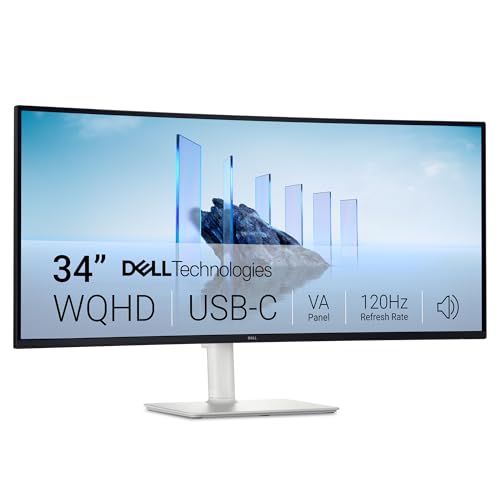
نرخ تازهسازی: تجربهای صاف و بدون پارگی با AMD FreeSync Premium (نرخ تازهسازی تا 120 هرتز) و زمان پاسخگویی بسیار کم 0.03 میلیثانیه، تجربهای جذاب را برای کار و بازی ایجاد میکند.
رنگهای زنده: از رنگهای زنده و واقعی با ۹۹ درصد sRGB و ۹۵ درصد پوشش DCI-P3 لذت ببرید. پنل VA با نسبت کنتراست 3000:1 و آمادگی HDR عمق، جزئیات و واقع گرایی خیره کننده ای را ارائه می دهد.
کیفیت صدای دوباره مهندسی شده: با صدای جادار با قدرت خروجی بیشتر، پاسخ فرکانسی عمیق تر و برد دسی بل بیشتر نسبت به نسل قبلی، از صدای دقیق تر لذت ببرید.
اتصال آسان: میز خود را با یک کابل USB-C (تولید برق تا 65 وات) سازماندهی و بدون شلوغی نگه دارید.
جدول مشخصات
نام تجاریدل
اندازه صفحه نمایش34 اینچ
قطعنامه1440p
نسبت ابعاد21:9
توضیحات سطح صفحه نمایشمات
نسبت تصویر21:9
پایان صفحهمات
نسبت کنتراست3000:1
نرخ تازه سازی120 هرتز
نوع نمایشگرLED
فناوری نمایشLED
زاویه دید178 درجه
روشنایی300
محدوده رنگ99
دارای صفحه نمایش رنگیبله
فناوری افزایش کیفیت تصویرفناوری راحتی چشم
اندازه صفحه نمایش (2)34 اینچ
ابعاد مورد D x W x H22.2D x 80.7W x 41.1H سانتی متر
وزن مورد9.38 کیلوگرم
حداکثر وضوح صفحه نمایش3440 x 1440 پیکسل
وضوح بومی3440x1440
زمان پاسخگویی0.03 میلی ثانیه
تعداد کل پورت های HDMI2
مجموع پورت های USB4
ویژگی های اضافیهمگام سازی تطبیقی، صفحه نمایش ضد تابش، بلندگوهای داخلی، کارآمد انرژی، تنظیم ارتفاع، تنظیم شیب
کاربردهای خاص محصولکسب و کار، دسکتاپ، ویرایش فیلم عکس
رنگخاکستر سفید
نوع نصبپایه میز
شماره مدلS3425DW
نام مدلمانیتور منحنی دل 34 پلاس USB-C - S3425DW
سازندهدل
تعداد واحد1 شمارش
اجزای شامل1 کابل USB-C به C 10 گیگابیت بر ثانیه 100 وات 1.00 متر، مانیتور، کابل برق، کارت QR، اطلاعات ایمنی/محیطی/قانونی، پوشش جانبی ورودی/خروجی، رایزر پایه و پایه
رتبه پرفروش ها#11784 در رایانه (به 100 برتر در رایانه مراجعه کنید)#356 در مانیتورهای رایانه
نظرات مشتریان4.54.5 از 5 ستاره (596) 4.5 از 5 ستاره
ComfortView Plus بهبود یافته: انتشار نور آبی مضر را تا ≤35٪ کاهش می دهد تا راحتی در تمام روز را بدون به خطر انداختن دقت رنگ کاهش دهد.
نرخ تازهسازی: تجربهای صاف و بدون پارگی با AMD FreeSync Premium (نرخ تازهسازی تا 120 هرتز) و زمان پاسخگویی بسیار کم 0.03 میلیثانیه، تجربهای جذاب را برای کار و بازی ایجاد میکند.
رنگهای زنده: از رنگهای زنده و واقعی با ۹۹ درصد sRGB و ۹۵ درصد پوشش DCI-P3 لذت ببرید. پنل VA با نسبت کنتراست 3000:1 و آمادگی HDR عمق، جزئیات و واقع گرایی خیره کننده ای را ارائه می دهد.
کیفیت صدای دوباره مهندسی شده: با صدای جادار با قدرت خروجی بیشتر، پاسخ فرکانسی عمیق تر و برد دسی بل بیشتر نسبت به نسل قبلی، از صدای دقیق تر لذت ببرید.
اتصال آسان: میز خود را با یک کابل USB-C (تولید برق تا 65 وات) سازماندهی و بدون شلوغی نگه دارید.
جدول مشخصات
نام تجاریدل
اندازه صفحه نمایش34 اینچ
قطعنامه1440p
نسبت ابعاد21:9
توضیحات سطح صفحه نمایشمات
نسبت تصویر21:9
پایان صفحهمات
نسبت کنتراست3000:1
نرخ تازه سازی120 هرتز
نوع نمایشگرLED
فناوری نمایشLED
زاویه دید178 درجه
روشنایی300
محدوده رنگ99
دارای صفحه نمایش رنگیبله
فناوری افزایش کیفیت تصویرفناوری راحتی چشم
اندازه صفحه نمایش (2)34 اینچ
ابعاد مورد D x W x H22.2D x 80.7W x 41.1H سانتی متر
وزن مورد9.38 کیلوگرم
حداکثر وضوح صفحه نمایش3440 x 1440 پیکسل
وضوح بومی3440x1440
زمان پاسخگویی0.03 میلی ثانیه
تعداد کل پورت های HDMI2
مجموع پورت های USB4
ویژگی های اضافیهمگام سازی تطبیقی، صفحه نمایش ضد تابش، بلندگوهای داخلی، کارآمد انرژی، تنظیم ارتفاع، تنظیم شیب
کاربردهای خاص محصولکسب و کار، دسکتاپ، ویرایش فیلم عکس
رنگخاکستر سفید
نوع نصبپایه میز
شماره مدلS3425DW
نام مدلمانیتور منحنی دل 34 پلاس USB-C - S3425DW
سازندهدل
تعداد واحد1 شمارش
اجزای شامل1 کابل USB-C به C 10 گیگابیت بر ثانیه 100 وات 1.00 متر، مانیتور، کابل برق، کارت QR، اطلاعات ایمنی/محیطی/قانونی، پوشش جانبی ورودی/خروجی، رایزر پایه و پایه
رتبه پرفروش ها#11784 در رایانه (به 100 برتر در رایانه مراجعه کنید)#356 در مانیتورهای رایانه
نظرات مشتریان4.54.5 از 5 ستاره (596) 4.5 از 5 ستاره
مصرف برق31 وات
ولتاژ240 ولت (AC)
امتیاز و نظرات
4.5
۵۹۶نظر
بر اساس نظرات آمازون
نظر شما میتونه به بقیه کمک کنه تا انتخاب بهتری داشته باشن خوشحال میشیم اگر تجربه تون از این محصول رو با ما به اشتراک بذارید!
نمایش ۵ نظر آمازون از ۵۹۶ نظر
Steph
Reviewed in the United States on 28 November 2025
My first monitor, amazing so far!
I purchased the 34 inch usb C on sale for $367 (with tax). I own a 15inch MacBook that I use for everything (don't have a desktop) and thought it pointless to spend unnecessary money when I can simply connect a monitor for half the price of a desktop. I’m very glad that I did! This monitor gives me ample space to work with multiple tabs, watch movies, browse the web, etc. It’s given me an excuse to not procrastinate on my work since I love using it so much. Here’s been my experience so far: Shipping was okay. It came in an Amazon box with the original manufacturing box inside. Nothing else was used to cushion the extra space around to avoid movement but monitor itself was secured ok enough inside the manufacturing box. The contents inside are the monitor itself, usb c cable, power cable, stand, the plate for the stand, and the back cover to hide the extra ports. Although instructions aren’t clear (they’re pictures), you only have to put the stand together by flipping the monitor and snapping the stand in place - top side first and then the bottom snaps in (watched a YT vid to make sure I was doing it correctly). You can adjust the monitor up and down and adjust the angle as well. After I connected the cables, all I did was connect my MacBook with the usb c and it automatically read the signal. Everything else was straightforward. I didn’t like the original settings so I played around and found what I liked: Color: RTS Hue: 50 Saturation: 62 Sharpness: 100 Brightness 8 Contrast 65. The display itself is pretty bright so make sure to adjust to your liking using the joystick button on the back. I wear blue light glasses since my eyes tend to be sensitive and the monitor itself is pretty bright already. I’ve absolutely loved the experience of it, but may just be that I love the amount of space I now have to work on. It’s made surfing the web a much better experience. For most movies and YT videos, you will get the black bars on the side but you get used to it after a wh
5.0
Rohit Mehta
Reviewed in India on 13 May 2026
Go for it. Worth the price and looks
A beautiful piece of machinery. I use it for work and I couldn't have asked for more. It elevated my whole work space
5.0
Jennie
Reviewed in Canada on 12 August 2026
Works great with MacBook Pro
Fantastic monitor. I use it next to two other 4K monitors and am very happy with the resolution and screen quality. I should add that I use this with an M4 Macbook Pro and it has worked flawlessly.
5.0
George T
Reviewed in Canada on 20 March 2026
Good monitor, it is what independant reviewer said it was and works great in my office
great monitor and as described and rated by independent reviewers. I use it in an office setting and it is working great. I started with the Dell software that sets up fixed areas on the screen to hold each app. It took forever to load and my apps, which are nothing unusual, would never stay there anyway. That is a feature I just turned off. My computer gives me the flexibility I needed.
5.0
Amit
Reviewed in the United States on 20 November 2025
excellent productivity hub
I needed a hub monitor for office work (programming, spreadsheets etc) and this fits the bill perfectly I much prefer having a single 2K monitor than trying to wrangle 2-3 HD monitors with arms and alignment and all that nonsense. This is way simpler and there's no bezels in the middle of my view. A huge plus is the USB-C with Displayport. I connect just 1 cable from my laptop to the monitor and that's it! Granted this monitor doesn't have as many USB inputs as Dell's more expensive Ultrasharp hubs, but this is half the price! If you need more ports then just buy a hub and plop it down next to this beast. The image quality and viewing angles are good. It's not an IPS monitor, and I probably would not have purchased this to do graphical work. But for text-based work this is fantastic! Setup was super simple. The packaging and instructions and clear and simple. All you need to do is put together the base (two pieces and a thumbscrew, no tools!) then just insert the base into the monitor mount and you're done! 60 second job.